oks-ui
Omkar Sahu · 8 min read
Published · Last reviewed · by Omkar Sahu
oks-ui's rule is that the package has no runtime dependencies other than React. You can check it: the published package.json of 1.4.1 has no dependencies field, and when I bundled a page that imports only the editor, the only package that ended up inside the bundle was oks-ui itself. React stays external.
For a rich text editor that is an expensive rule. The editor folder in the source is about 13,000 lines of TypeScript and CSS, backed by about 5,500 lines of unit tests and more than 100 browser tests that run in Chromium, Firefox and WebKit. The first version landed on 21 July 2026 and the folder has had 63 commits since. Most of those commits are the fixes below.
A document is plain data, an array of blocks, and you own it:
"use client";
import { useRef, useState } from "react";
import "oks-ui/tokens.css";
import { TextEditor, blocksFromMarkdown, type Block, type TextEditorHandle } from "oks-ui/text-editor";
import "oks-ui/text-editor.css";
import { Button } from "oks-ui/button";
import "oks-ui/button.css";

declare function save(markdown: string): void;

export function Notes({ saved }: { saved: string }) {
  const [blocks, setBlocks] = useState<Block[]>(() => blocksFromMarkdown(saved));
  const editor = useRef<TextEditorHandle>(null);
  return (
    <>
      <TextEditor ref={editor} label="Notes" value={blocks} onChange={setBlocks} />
      <Button color="primary" onPress={() => save(editor.current!.toMarkdown())}>Save</Button>
    </>
  );
}
That compiles under TypeScript 7 in strict mode against oks-ui 1.4.1. Each block is an object with an id, a type, props, content (runs of text with styles, or links) and children.
On screen, each line of text is its own editable box. That keeps typing native and cheap, and it is also the root of most of what broke: the browser's own selection, undo and formatting all stop at the edge of one box, so anything that crosses a block has to be built by hand. The editor keeps its own selection layer across blocks and draws it with the CSS Custom Highlight API, falling back to tinted blocks where that is missing.
I rendered the same test page with oks-ui 1.1.2, 1.2.2 and 1.4.1 and ran the same steps in Chromium, Firefox and WebKit (the link row in Chromium only; the footnote in the table says where the browsers differed):
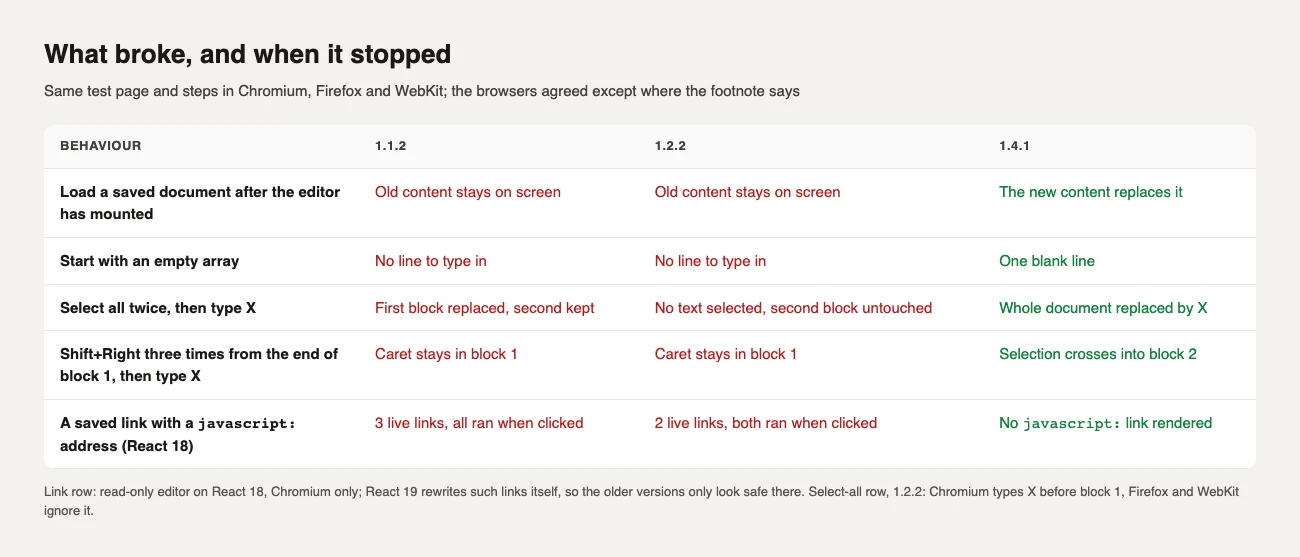
value used to be read once, when the editor mounted. Load a saved document after that, reset a form, or switch records, and the old content stayed on screen. The only workaround was to remount with a key. In 1.4.1 a new value from outside replaces the content and becomes the undo starting point, while the usual value={blocks} onChange={setBlocks} loop, and a parent that passes an equal copy of the same content, leave the caret and the undo history alone.
A neighbouring bug: value={[]} rendered no blocks at all, so there was nothing to click or type into. It now starts with one blank paragraph.
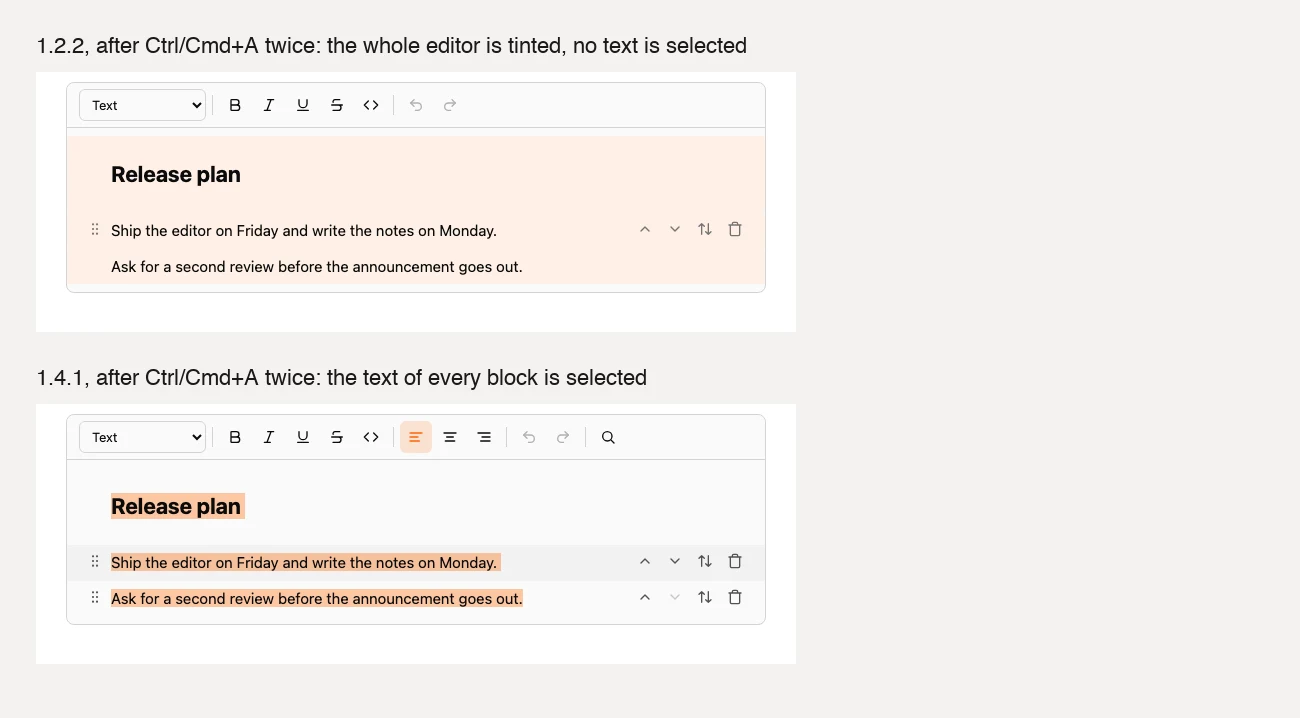
Because every line is its own box, a drag across blocks could only select whole blocks, and the keyboard could not leave a block at all. In 1.4.1, Shift plus the arrow keys at the edge of a line, a mouse drag from one block into another, Shift plus click, and Ctrl or Cmd plus A pressed twice all select across blocks, and typing, Backspace, Enter, cut, copy, paste and the formatting buttons then act on the whole selection.
A document can come from a database, so a block's URL cannot be trusted just because the editor put it there. I saved a document with three blocks whose address was a javascript: URL (a text link, a bookmark card and a file card), rendered it read-only on React 18 and clicked each one. In 1.1.2 all three ran their code. In 1.2.2 the bookmark and the file card still did. In 1.4.1 no such link is rendered: links allow only web, mail, phone, in-page and relative addresses, and media allows web, blob:, relative and inline raster images.
A caution that I only learned by testing: on React 19 the older versions looked safe, because React replaces a javascript: address with a harmless one itself. If you are on React 19 you were protected by React, not by the editor, and if you are on React 18 you were not.
Typing used to re-render every block and copy the whole document for undo on each keystroke. Rows are now memoised and undo shares the blocks that did not change. I measured one typed character in the middle of a document, wall time including layout, in headless Chromium:
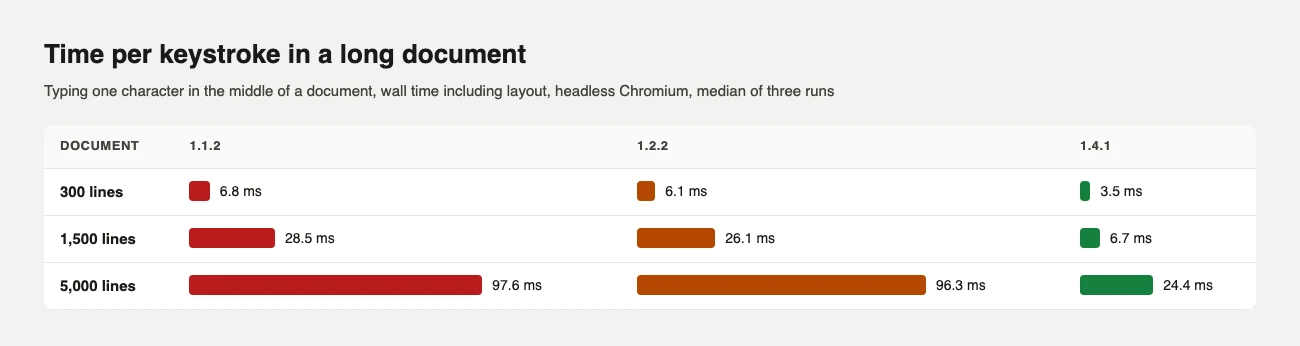
At 1,500 lines that is 28.5 ms in 1.1.2 and 6.7 ms in 1.4.1; at 5,000 lines, 97.6 ms against 24.4 ms. Version 1.2.2 was no better than 1.1.2 here, so the improvement arrived after 1.2.2 (the changelog lists it under 1.4.1; I did not measure 1.3.x). These are timings on my Mac, so read the ratios and not the milliseconds. The changelog quotes larger figures (about 355 ms to 52 ms at 1,500 lines) because it measures only React's own work per keystroke and leaves out layout.
document.execCommandUntil 1.4.1 bold, italic, links and the other formats were applied with document.execCommand, which MDN marks as deprecated. Version 1.4.1 applies them to the document data instead, inside whichever line holds the selection, table cells and toggles included, and then restores the selection.
I expected to be able to show a cross-browser difference here and could not. Bold on a selected word produced <b>world</b> in Chromium, Firefox and WebKit on 1.2.2, and <strong>world</strong> on 1.4.1. The stored data was identical in every case, and a format chosen at a bare caret applied to the next typed characters in both versions. So the honest reason for the change is the one in the design: formatting has to work across several blocks and inside table cells, which a single-region browser command cannot do. A test in the repository now fails if execCommand comes back.
I bundled a page that imports only the editor, React left external, then minified and gzipped it:
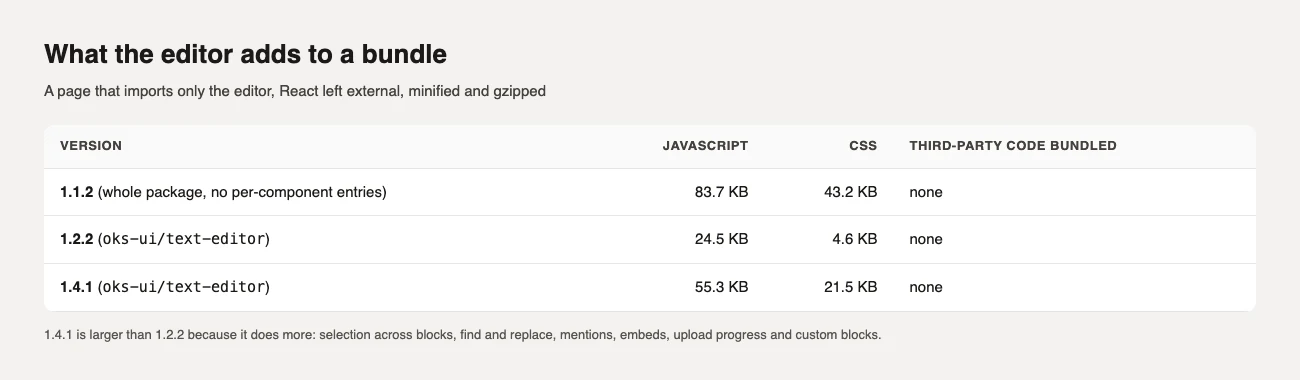
The 1.1.2 line is the whole package, because it had no per-component entry points. From 1.2.2 to 1.4.1 the editor more than doubled in JavaScript (24.5 to 55.3 KB) and its CSS grew from 4.6 to 21.5 KB. That is the price of selection across blocks, find and replace, mentions, embeds, upload progress and custom blocks. If you only need a small formatted textarea, 1.4.1 is more editor than you need.
The Text editor component page has every prop and a live editor. For what else changed in the same release, see the oks-ui 1.2 notes.
I'm a front-end engineer based in Hyderabad, India, with more than 17 years of professional experience. I spent 12 years as a senior front-end developer, designing and building websites, and I have worked as a full-stack developer since 2022. I created oks-ui, a React component library with no runtime dependencies, and I write and maintain this site.