oks-ui
Omkar Sahu · 6 min read
oks-ui 1.4.0 was on npm for part of one day and then I withdrew it. Here is exactly what happened, from npm's own record and the commit history, what a withdrawn version costs, and what changed in the way I release.
What happened
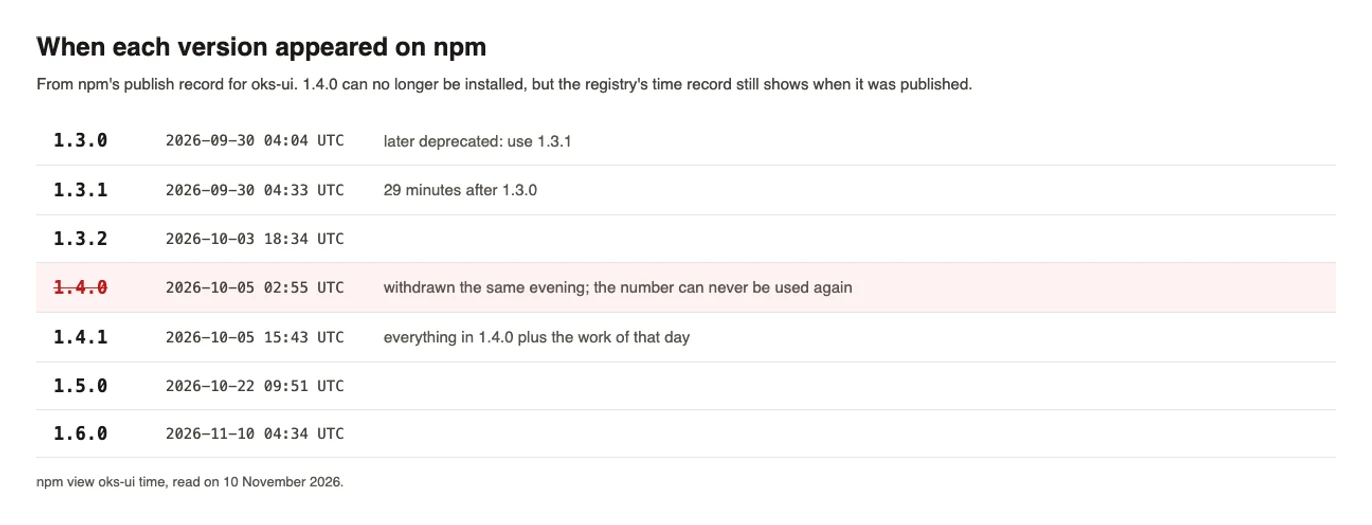
oks-ui 1.4.0 appeared on npm at 02:55 UTC on 5 October 2026. It was the release that added two components, TreeView and Rating, together with a much larger TextEditor and several new Chart features. That evening it was unpublished. The same changes, plus more that had been finished in the meantime, were published as 1.4.1 at 15:43 UTC the same day.
The 1.4.1 changelog opens with a plain notice, so that anyone who installed 1.4.0 would see it:
1.4.0 was published for a few hours on 2026-10-05 and withdrawn; this release is everything that was in it plus the changes listed first below. If you installed 1.4.0, move to 1.4.1.
Nothing was broken in a way that needed an emergency. This is not an account of a security problem or a crash in 1.4.0, and the post does not pretend it is one. It is an account of a release decision that was undone, and of what that costs a package.
The timeline
All times are from npm's publish record, which is in UTC, and from the repository's git history.
- 30 September, 04:04 UTC. Version 1.3.0 is published. Twenty-nine minutes later, at 04:33, 1.3.1 follows, because 1.3.0 shipped two entries (
oks-ui/text-editorandoks-ui/pagination) with a"use client"marker that stopped their plain helper functions from being called on a server. 1.3.0 was marked deprecated on npm with a message pointing to 1.3.1. This earlier case matters, because it was already a quick correction of a version published too soon. - 4 October, evening (local time). The release commit for 1.4.0 is made. Over the following night and morning, ten more commits follow it, including chart fixes, reference lines, a time axis, and several commits that change only tests, to make a paste test in the editor pass on Firefox on Linux, the one place it behaved differently.
- 5 October, 02:55 UTC. 1.4.0 is published.
- 5 October, during the day. More work is finished: sparkline and combo chart types, an Edit and Preview switch for the TextEditor, and a way to add your own CSS class to a block.
- 5 October, evening. 1.4.0 is unpublished.
- 5 October, 15:43 UTC. 1.4.1 is published with everything.
Advertisement
Why it was withdrawn
The version had not failed. The reason was a decision about release practice, not a defect: the maintainer did not want two releases on the same day. So instead of publishing a small follow-up on top of 1.4.0, 1.4.0 was unpublished and everything, including the work finished that day, was released as 1.4.1.
The alternative was a patch release on top of 1.4.0, which would not have burned a version number. The rest of this post is about what the chosen route costs, and about what npm offers instead.
What withdrawing a version costs
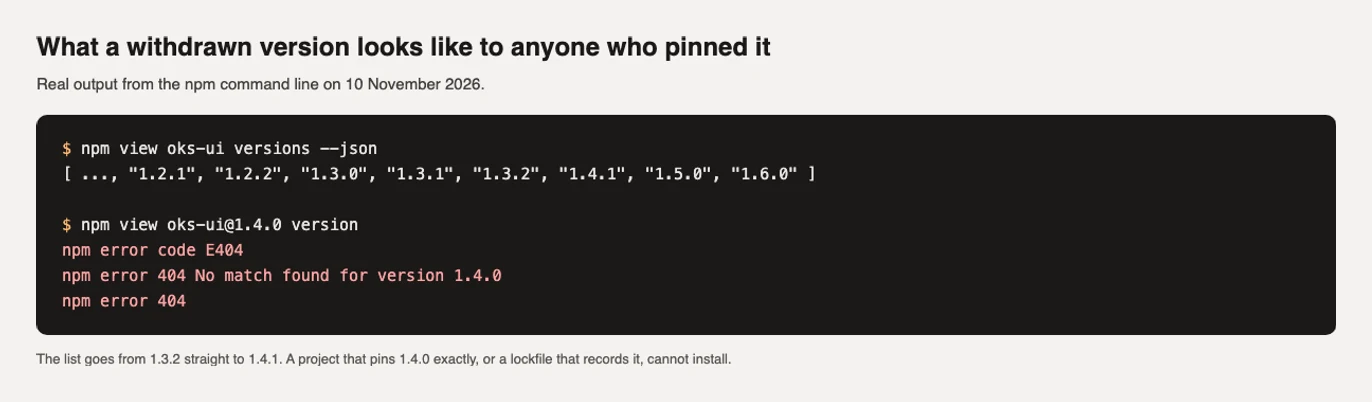
npm lets you unpublish a version, but it does not let you publish that number again. Version 1.4.0 can never exist again, for anyone, so there is now a permanent gap in the version list: 1.3.2, then 1.4.1. The list of published versions today reads …, 1.3.1, 1.3.2, 1.4.1, 1.5.0.
For people who use the package, the effects are these:
- A range such as `^1.3.2` still works. It resolves to the newest matching version, so a fresh install took 1.4.1.
- A project that pins exactly `1.4.0` cannot install.
npm view oks-ui@1.4.0returns a 404 not found. A lockfile that records 1.4.0 fails in the same way. - There is no way to tell afterwards how many people installed 1.4.0. The daily download total for 5 October was 364 across all versions, which includes automated installs and mirrors, so it says very little about people.
- The changelog needs a note, as above, or the history of the package makes no sense to someone reading it later.
What changed afterwards
The 1.4.0 episode was one of a series of lessons about the difference between "the package is on npm" and "the release is finished". Three changes came out of that.
1. Releases go through npm's staged publish. A version is published in two steps: it is staged, and then approved in a browser by the maintainer. The approval is a deliberate second step, and it is where a second look happens.
2. A written checklist, and a script that checks it. On 24 October, after 1.5.0, the repository gained docs/internal/release-checklist.md and npm run release:verify. The first line of the checklist is the whole idea: a release is not done when the package is on npm, it is done when the verify script prints that the release is complete. The script checks nine things:
- npm's latest version is the one being released,
- the changelog has a dated section for it,
- the tag exists on GitHub,
- the tag is merged into the main branch,
- no pull request is waiting to be merged,
- the website depends on the new version,
- every component page on the live site answers with a 200,
- the "what's new" page is live,
- and the localization guide is live.
The last items came from 1.5.0, where the package was published on 22 October but the website showed the old version until 25 October, because the deploy was a separate step that nobody had listed. A published package with an old website is not a finished release.
3. A rule for what counts as a release. Unreleased work stays under [Unreleased] in the changelog, the version in package.json stays at the last published number, and a version bump is made once, for the whole batch, at the time of release. It is not made per commit or per component. That keeps the number on the package honest and makes a withdrawn number far less likely.
Unpublish or deprecate
npm gives two ways to take a version out of use, and they are not the same. Unpublishing removes the version, and its number can never be used again. Deprecating keeps the version installable, for anyone who pinned it, and prints a message that can name its replacement. The 1.3.0 case used deprecation: the message says what is wrong and points to 1.3.1. For a version that is public and not harmful, deprecation costs nothing and keeps the version list whole. Unpublishing is the tool for a version that must not be installed at all, such as one that leaks a secret or ships the wrong code.
Limits
This account uses npm's publish times and the repository's commits. It does not include the exact minute 1.4.0 was unpublished, because npm's public record does not keep it, and the evening in the timeline is the maintainer's local evening. The number of installs of 1.4.0 is not known. The three changes after the incident are real and dated, but they were made over three weeks and in response to more than this one event.
If you pinned 1.4.0 and are stuck, move to 1.4.1 or any later version: every one of them contains everything 1.4.0 had. And if something here is wrong, tell me through the contact page.